Live Weather
- 0.0
- Rating
- 10.00K
- Installs
- Free
- Price
 Analysis by App-foxy
Weather apps are easy to underestimate. I usually open one while standing near the door, carrying a bag, checking a commute, or deciding whether a plan needs a backup. In that moment, I do not want a complicated dashboard; I want information that is quick to notice and easy to understand. Live Weather, from Sri Chaitanya Mahaprabhu, takes that straightforward approach by focusing on current weather information and the forecast for today.
After spending time with it, my impression is that its strongest appeal is simplicity. It is a free weather app for Android, suitable for everyone, and its modest footprint of over ten thousand installs gives it the feel of a focused utility rather than a crowded mainstream platform. The current release is version 1.3 and works on Android 7.0 or later, so it can suit people who keep an older phone instead of upgrading frequently.
I would recommend trying it if your main question is, “What should I expect today?” I would be more cautious if you need detailed weather maps, long-range planning, severe-weather tools, or highly customizable alerts. The useful distinction is not whether a small weather app can replace every other option; it is whether its direct presentation fits the way you personally check the sky.
You May Also Like

 Pandora - Music & Podcasts
Pandora’s Music Is Easy to Start, but Harder to Recover
Pandora’s strength is its low-effort path from a seed to a station. Its weak spot is how much confidence it asks you to place in connection, setup, and quiet recovery.

 AccuWeather: Weather Radar
AccuWeather Review: A Quick, Clear Forecast for Everyday Decisions
For everyday plans, the best forecast is the one you can understand quickly. AccuWeather makes rain timing, radar, and local conditions easy to act on, with a few trade-offs.

 Hill Climb Racing
Why Hill Climb Racing Still Turns Crashes Into One More Run
A tiny car, a bumpy hill and one more upgrade: Hill Climb Racing keeps resurfacing because its simple chaos makes every near-miss feel personal.

 AliExpress - Shopping App
AliExpress Makes Global Shopping Feel Personal, but Shoppers Bear the Risk
AliExpress turns a global marketplace into a pocket-sized discovery engine. Its reach is useful, its shopping loop compelling, and its trade-offs easy to miss.

 Lords Mobile: Kingdom Wars
Lords Mobile Is a Kingdom-Building Routine, Not a Quick Match
A case-by-case verdict on the building, battles, device demands, and social commitments that make Lords Mobile rewarding for some players and exhausting for others.

 PDF Scanner app - TapScanner
TapScanner Makes Paperwork Easier to Capture, Check, and Share
TapScanner makes scanning with a phone feel less like a rescue operation and more like a dependable step in getting work done. Its capture tools are useful, though not flawless.
More From Our News Desk
View All News


How the information feels to read and navigate
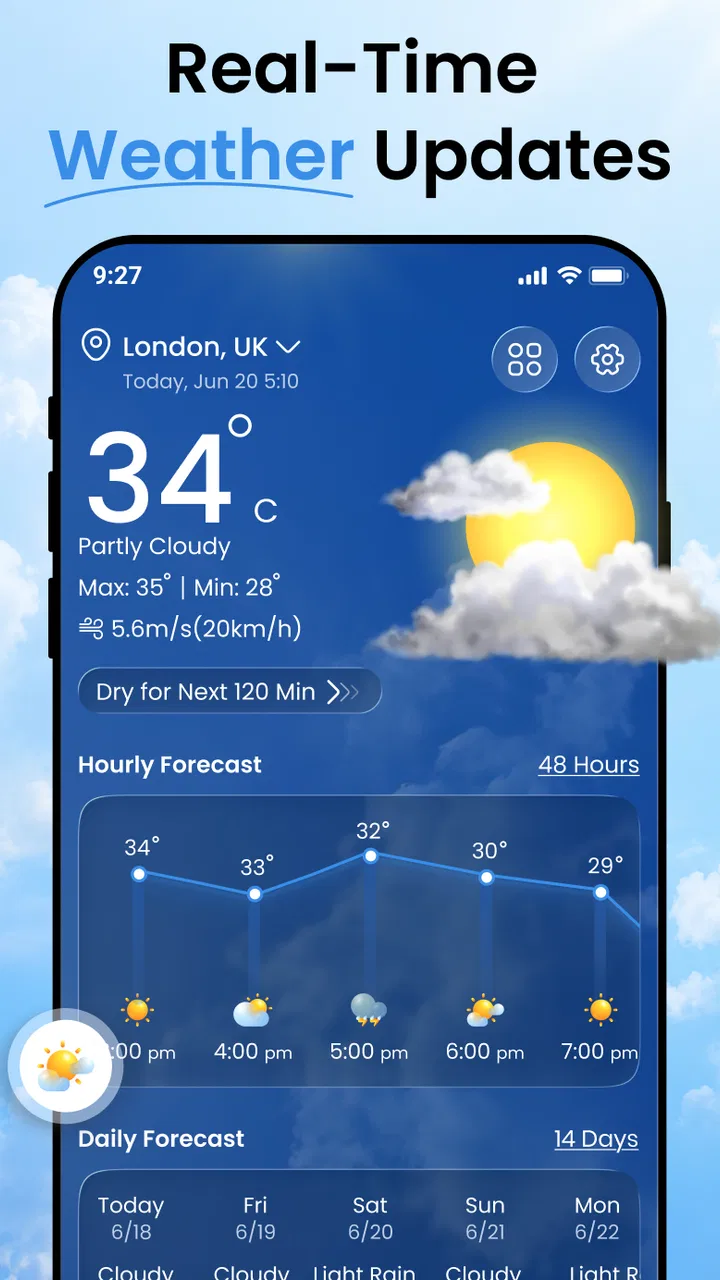
The first thing I look for in a weather app is whether I can understand the main screen without studying it. Live Weather is built around the idea of checking today’s conditions and live updates, so the experience is best approached as a quick glance rather than a deep research session. That makes it potentially comfortable for users who prefer a limited number of decisions when opening an app.
For someone with a busy routine, this matters more than it sounds. A parent preparing children for school, a delivery worker beginning a shift, or a commuter deciding between walking and taking transport may only have a few seconds. A weather tool that puts the immediate situation first can be more useful than one that presents layers of charts, cards, advertisements, and secondary measurements before reaching the basic forecast.
I also see an advantage for people who are less confident with technology. There is less pressure to learn a complicated weather vocabulary or understand specialist visualizations before getting value from the app. The concept is familiar: open it, look at today, and use that information to make a practical decision. That kind of predictable purpose can reduce cognitive load, especially for older users or anyone who becomes frustrated by busy interfaces.
Still, simple does not automatically mean accessible. Readability depends on details such as text size, contrast, spacing, and whether important information is visually separated from less important information. Android’s own display and font controls may help some people enlarge text, but enlargement can also create cramped layouts in apps that are not designed to reflow gracefully. I would test the screen with the phone’s preferred text size rather than assuming the default will work for everyone.
My practical advice is to open the app in the conditions where you will normally use it. Check it indoors, outdoors, and while moving through a typical routine. If you can identify the current weather and today’s outlook without squinting or repeatedly searching the screen, the design is doing its job for you. If you have to rely on tiny labels or distinguish several similar visual elements, the simplicity becomes less helpful.
Why a focused daily view can be useful
The daily focus has a specific strength: it discourages overthinking. Many weather decisions are immediate. I may need to know whether a light jacket is sensible, whether outdoor furniture should be moved, or whether a short errand is likely to be uncomfortable. For those situations, a concise view can be more usable than a full meteorological toolkit.
There is also a hidden trade-off. A compact presentation may leave less room for context. If you are comparing several parts of the day, planning a trip, or deciding whether an event can safely continue, you may want more detail than a daily snapshot provides. In that case, I would use Live Weather as a first check and confirm important decisions with a more specialized source.
That is especially relevant when conditions are changing quickly. “Live” sounds useful, but a user should still treat any app as a source of guidance rather than a guarantee. Weather changes, forecasts are estimates, and a screen cannot replace local judgement during hazardous conditions. The app’s direct style works best when paired with sensible caution, not when used as the sole basis for a high-consequence decision.
Motor, sensory, and cognitive considerations
Weather checking is often a one-handed task. I might be holding keys, a cup, a child’s hand, or a shopping bag while opening an app. That makes touch targets and the number of required interactions important. A focused weather utility has an opportunity to be easier than a feature-heavy alternative because the user may not need to move through many menus before reaching the relevant information.
However, I would not describe the app as universally accessible based only on its purpose. People with limited dexterity still need controls that are forgiving and easy to activate. If a button is small, if several controls sit close together, or if an accidental tap changes the view, the experience can become tiring. Users who have tremors or reduced precision should spend a little time testing whether ordinary taps work comfortably on their device.
For users with visual impairments, the key question is whether the weather information is communicated through more than color or decorative symbols. I would not rely on a color change alone to understand whether conditions are improving or worsening. Textual descriptions are generally more dependable, particularly for people with color-vision differences or for anyone viewing the screen in strong sunlight.
People with low vision may benefit from Android’s magnification, larger display settings, or increased contrast options, but those tools are not a substitute for thoughtful in-app layout. Enlarged content can force extra scrolling or cause important labels to compete for space. My recommendation is to test the combination of Live Weather and your usual accessibility settings before depending on it for a daily routine.
Screen glare is another practical issue. Weather apps are often used outside, precisely when visibility can be difficult. A display that looks clear in a dim room may be harder to read under direct sunlight. I found that the best workflow is to check the forecast before leaving, then use a brief glance outdoors rather than trying to interpret a dense screen while walking.
Users who are deaf or hard of hearing can still benefit from a weather app because its core value is visual. That said, visual information must be prominent enough to notice without relying on sound. If the app uses any device-level notification behavior, I would not assume that an audible signal is sufficient; people who cannot hear alerts should keep the app alongside their normal visual safety habits and local weather warnings.
A realistic everyday routine
Imagine leaving home for work with a short walk to transport, followed by several hours indoors and an evening trip back. I would open Live Weather before getting dressed, read the current conditions, and check the outlook for the day. If the forecast suggests an uncomfortable change, I can adjust clothing or carry protection before stepping outside. The value is not dramatic; it is the small reduction in avoidable surprises.
For a person with memory difficulties, repeating that same routine can be helpful. The app becomes a consistent checkpoint rather than another complicated system to remember. I would place it where it is easy to find and use the same sequence each morning. A predictable habit is often more inclusive than a long list of optional tools that require learning.
For someone with limited mobility, the app can support planning without requiring a trip outside just to judge the conditions. A caregiver might check the day before arranging an appointment, while a wheelchair user may use the forecast to decide whether a route with fewer exposed sections is preferable. The app cannot describe the condition of pavements or building entrances, but it can contribute one useful piece of the planning process.
For users with sensory sensitivities, weather information can also help anticipate uncomfortable environments. Heat, cold, rain, and bright outdoor conditions may affect energy and concentration differently from person to person. A simple daily check can make it easier to schedule demanding activities at a more manageable time, although users should remember that a general forecast cannot capture every local microclimate.
Where the straightforward approach reaches its limits
The main limitation is scope. Live Weather is appealing when I want a quick daily answer, but I would not choose it as my only tool for detailed travel planning, outdoor work with strict timing, or serious storm monitoring. A larger weather service may offer radar, hourly comparisons, extended forecasting, location management, weather warnings, or richer explanations. Those additions can be excessive for casual use, yet valuable when the decision carries more risk.
This also affects users who prefer personalization. Some people want to rearrange information, change units, save many locations, or receive carefully timed reminders. I would not install a small, focused app expecting it to behave like a full weather platform. Before making it part of a complex routine, consider whether its direct daily purpose matches the number of locations and decisions you need to manage.
There is a similar issue for people who depend on assistive technology. Android offers tools that can improve access, but the quality of the experience depends on how the app’s controls and text interact with those tools. Users who navigate primarily with a screen reader, switch access, or alternative input should test the essential path themselves: opening the app, locating today’s forecast, and returning to the main view. If any of those steps are unclear, a more established alternative with broader accessibility documentation may be safer.
Another trade-off is trust. A weather app earns trust through consistency, but I would avoid treating a clean interface as proof of greater accuracy. The developer is Sri Chaitanya Mahaprabhu, and the app is still a relatively small utility rather than a service I would automatically place alongside official emergency channels. For ordinary planning, it may be enough. During dangerous weather, I would also consult local authorities and established warning services.
The age rating of Everyone makes the app suitable in principle for a broad audience, including families looking for a simple weather check. Parents should still teach children how to interpret forecasts sensibly. A young user may read an icon or temperature as a certainty, while real conditions can differ by neighborhood and change during the day. The app can support a conversation about preparation, but it should not encourage children to ignore adult guidance.
Its free price removes the most common barrier to trying it. That is useful for people who cannot justify another subscription or who only need basic weather information. At the same time, free access should not be confused with a complete replacement for every specialist service. If you need dependable tools for work, travel, health planning, or emergency awareness, compare the app’s practical output with the requirements of that situation rather than choosing solely because it costs nothing.
Who I think will benefit most
I see Live Weather working best for people who want a low-effort daily check on an Android phone. It may suit a student deciding what to wear, an older relative who prefers a direct screen, a commuter checking conditions before leaving, or a household that wants a simple forecast tool without paying for advanced functions.
It is also a reasonable option for users with older devices, since Android 7.0 support includes phones that may not run every newer application comfortably. That does not guarantee identical performance on every handset, but it makes the app relevant to people who value compatibility over the latest interface trends.
I would skip it if your priority is deep analysis. A photographer planning a sunrise session, a farmer coordinating outdoor work, a traveler comparing several destinations, or an event organizer monitoring changing conditions may need a more specialized service. The same goes for anyone who wants accessibility features clearly documented before installation; in that situation, a product with detailed support information may be the better choice.
One useful way to decide is to define your most common weather question. If it is “What is today likely to feel like?” this app’s focused design may be enough. If it is “Which hour has the lowest rain risk across three locations, and what warnings are active?” you are probably looking for a different class of tool. Choosing based on that question prevents disappointment.
My inclusive verdict
Live Weather is a modest, approachable weather app with a clear everyday purpose. I like the idea of opening one focused screen instead of navigating a crowded forecast service, and I can see why that would help users who value low cognitive load, older Android compatibility, and a free way to check the day ahead.
Its inclusive potential comes from the simplicity of the task, not from any claim that every ability or situation is covered. People with visual, motor, hearing, or cognitive needs should test it with their normal Android settings and in the environments where they will actually use it. Outdoor glare, small controls, screen-reader navigation, and the need for more detailed forecasting can all change the experience.
My final recommendation is practical: try it for a few ordinary mornings and judge whether you can find the information you need without strain. Keep a second, more authoritative source for severe weather or high-stakes plans. The best reason to choose Live Weather is not that it does everything, but that it may make one important daily question easier to answer.
As a free app in the weather category, with an Everyone rating and a current version of 1.3, it is worth considering for uncomplicated daily checks. I would describe it to a friend as a useful starting point rather than a complete weather command center: accessible in spirit, potentially convenient for many routines, and best when its limits are understood before the forecast matters most.
FAQs for Live Weather
01What is Live Weather, and what can I use it for?
Live Weather is a weather application designed to provide current conditions, forecasts, temperature information, precipitation details, wind data, and other useful meteorological updates. After installing it, users can check the weather for their current location or search for additional cities. It is helpful for planning commutes, trips, outdoor activities, and everyday schedules without relying only on a general television forecast.
02Does Live Weather require access to my location?
Live Weather can use location access to automatically identify your current city and display locally relevant weather information. This permission is usually optional, so you may be able to deny it and manually enter a location instead. If privacy is important to you, review the permission request carefully and choose whether the convenience of automatic updates is worth allowing location access while using the application.
03How accurate are the forecasts in Live Weather?
Forecast accuracy in Live Weather depends on the weather data providers, your location, and how far ahead you are checking. Current conditions and short-term forecasts are generally more dependable than predictions several days into the future. The app should be treated as a useful planning tool rather than an absolute guarantee, particularly during rapidly changing or severe weather conditions.
04Does Live Weather provide weather alerts and notifications?
Live Weather may offer notifications for forecast changes, rain, storms, temperature changes, or other weather events, depending on the version and the settings available on your device. You can normally adjust which alerts you receive or disable notifications completely. Before depending on the app for safety information, check that alerts are enabled and remember that official emergency services remain the best source for urgent warnings.
05Is Live Weather free to download, and are there advertisements or in-app purchases?
Live Weather may be available as a free download, but the exact features and business model can vary by platform and app version. Free users may encounter advertisements, while some advanced tools, customization options, or an ad-free experience could require an in-app purchase or subscription. Check the Google Play Store or Apple App Store listing before downloading to confirm current pricing and included features.
Pros
- Clear hourly and daily forecasts at a glance
- Useful radar maps for tracking approaching rain
- Weather alerts help users prepare for severe conditions
- Supports multiple locations for travel or family planning
- Clean interface makes key conditions easy to find
Cons
- Some advanced forecasts may require a premium subscription
- Advertising can make the free experience feel cluttered
- Forecast accuracy depends on location and available data
- Radar and live updates may use considerable mobile data
- Frequent notifications may feel excessive for some users

Live Weather
Gallery